For Notfallseelsorge, crisis intervention and PSNV teams

Nobody goes out alone.

Sodalis holds a team's duty roster, knowledge base, contacts and incident documentation in one place — so that at three in the morning it is settled who is on duty, and who gets asked next.

What is in it

No sign-up, no e-mail address. You get your own instance with realistic data, deleted an hour later. The application itself is in German.
  • Servers in Germany
  • A separate database per team
  • Two-factor sign-in, mandatory
  • No US data processors
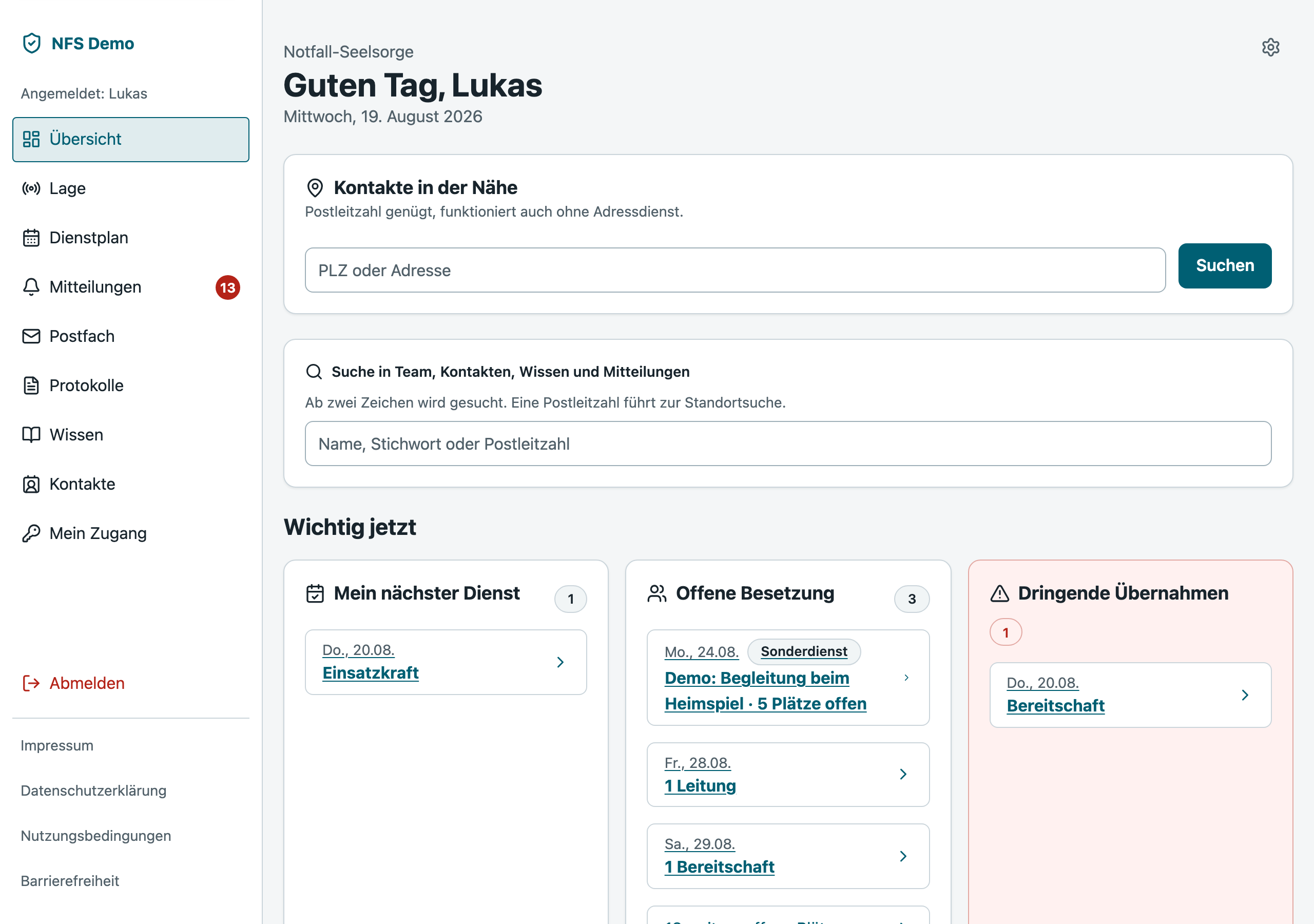
Screenshot to follow
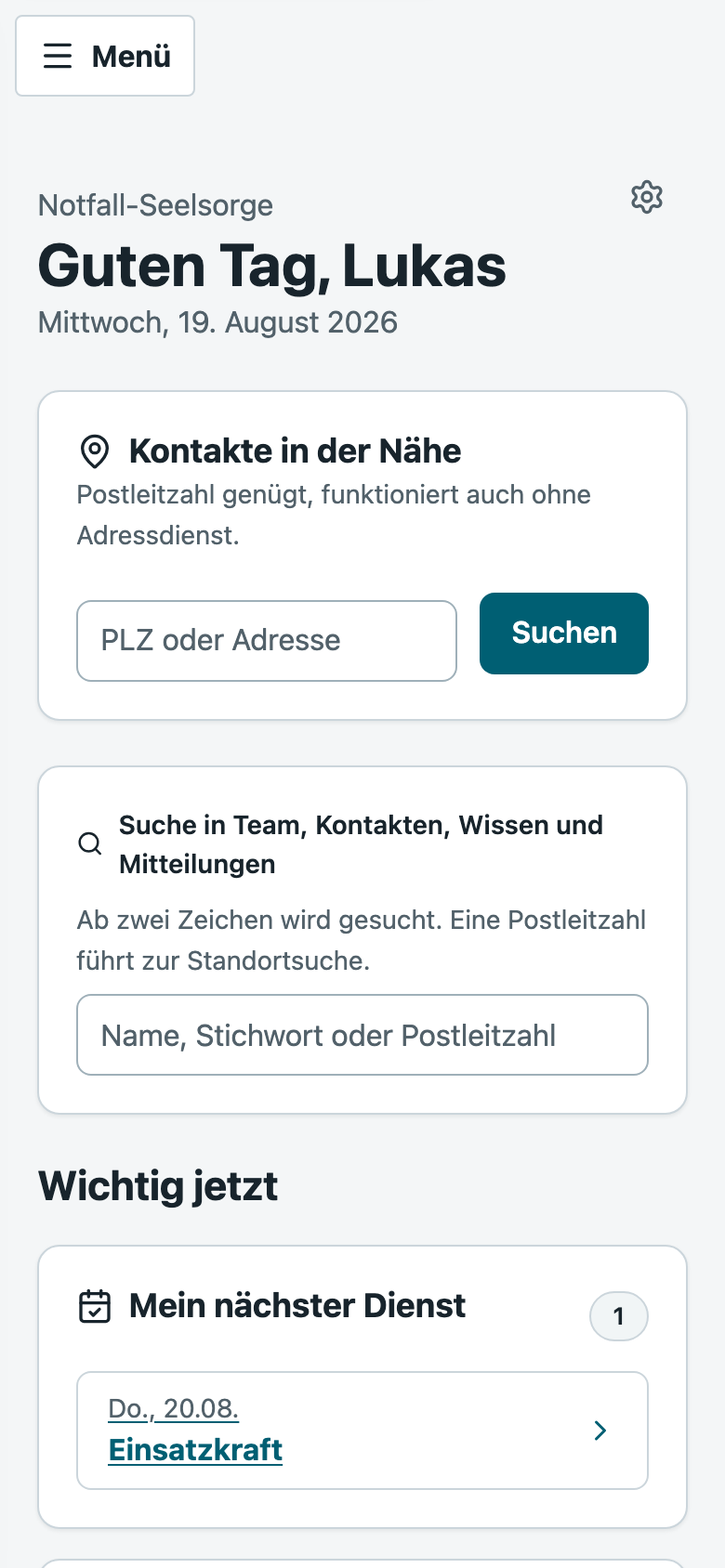
Dashboard: today's duty, open requests, gaps in the plan
The everyday

The work before the work

The call-out is one thing. The other is everything that has to happen so that somebody is there at all. Three sentences you hear in almost every team:

Only one person understands the spreadsheet.

The roster lives in a file that one person maintains. Anyone looking for cover writes to them. While they are on holiday, planning stops.

The request drowns in the group chat.

Short-notice cover gets asked for in a chat with fifty people. Anyone willing to answer has no idea whether somebody already said yes — so they stay quiet.

At year end, the numbers are missing.

The sponsoring body, the supervisory authority or the funder wants a report. It gets assembled from memory, scraps of paper and a long search through old messages.

Duty roster

Signing up takes a minute, not an evening

Everyone enters their own availability. The team lead sees immediately where it is getting thin, and no longer has to ring round.

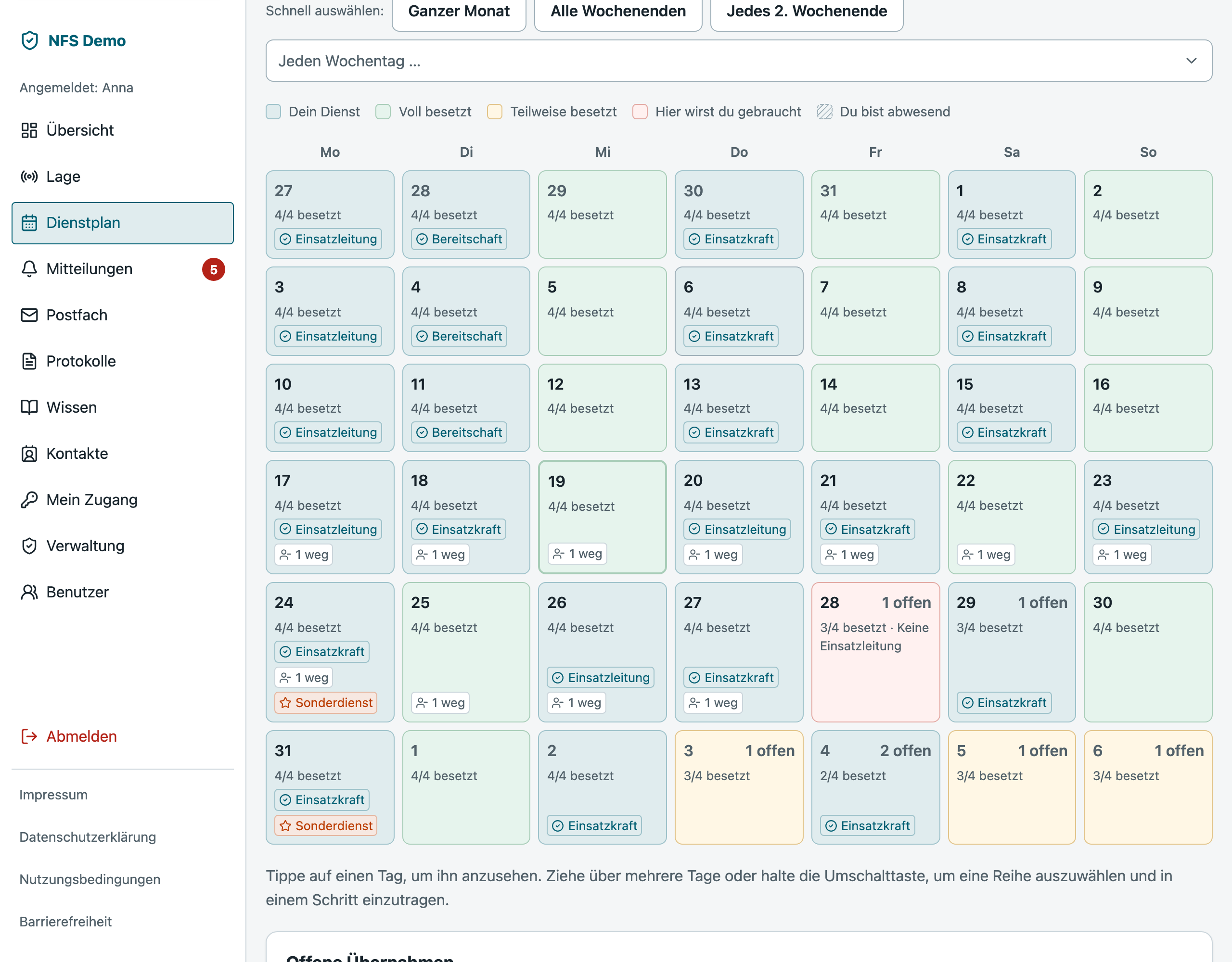
  • Month grid with multi-selectMark a whole month, save once. Three roles — duty lead, field responder, standby — and one role per person per day.
  • Cover and swaps, with a deadlineUp to fourteen days before a duty, signing out is enough. After that it goes through a request: to one named person or open to the team, always with a response deadline and a visible status.
  • Short notice means urgentUnder 24 hours a request is marked urgent and overrides recipients' quiet hours. Anything above that deliberately does not.
  • Absence instead of a gapHoliday and training are recorded, not merely absent. The plan distinguishes between cannot and has not answered yet.
  • Special duties alongside the rotaTown festival, large-scale exercise, memorial service: events with their own staffing and sign-up, without disturbing the running roster.
Screenshot to follow
Month grid with multi-select, three roles, gaps highlighted
On call

The screen that matters at two in the morning

Everything needed during a call-out on one surface — and the most important part of it runs with no network dependency at all.

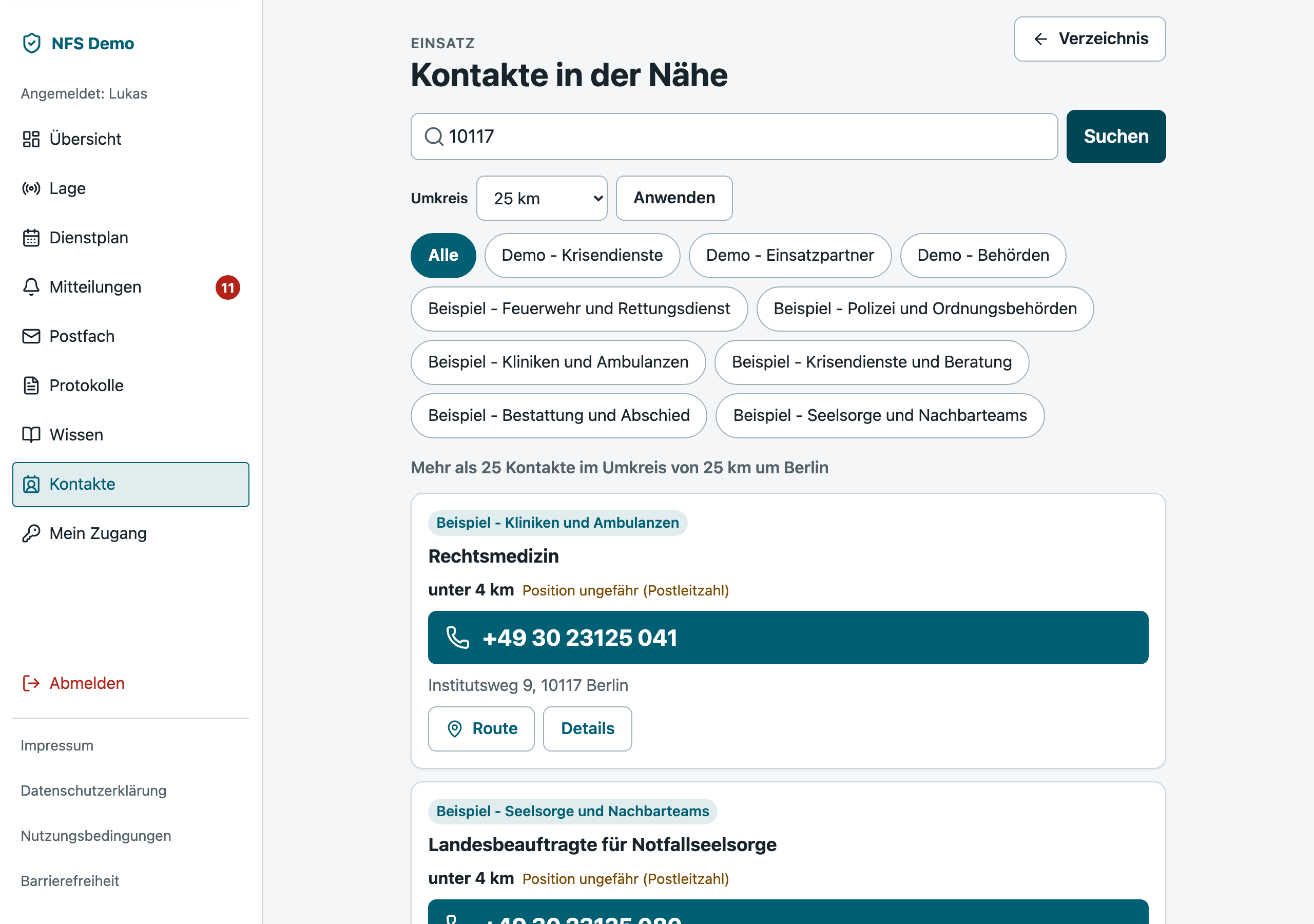
  • Proximity search with no third partyEnter a postcode, get contacts sorted by distance. It resolves against a centroid table inside the system — without a single call to an external provider. If half the internet is down, it still works.
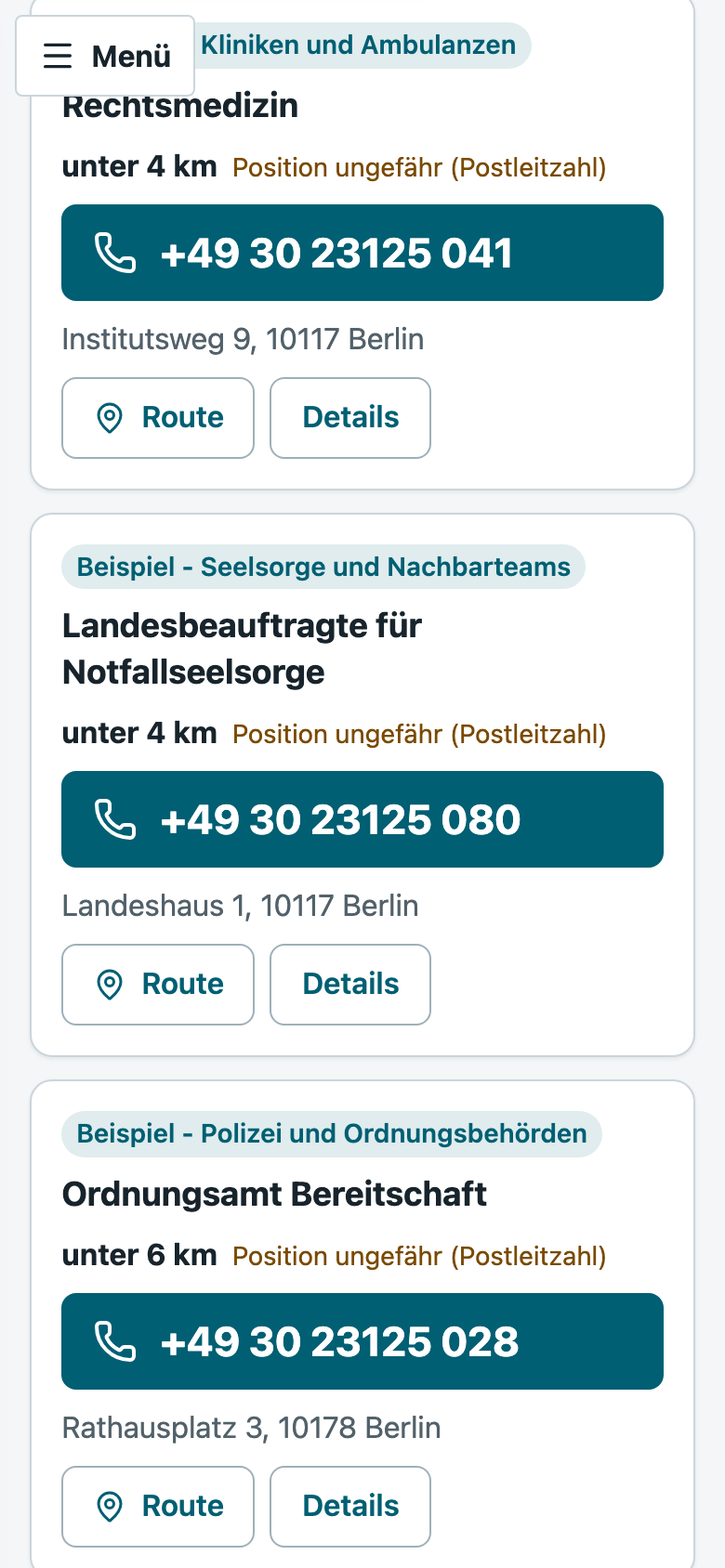
  • Call with one tapNumbers in the largest type size, tappable, directions with a second tap. Distance is shown as a band (about 3–5 km), never as false precision.
  • Incident companion, not a memory exerciseStart the incident, record who is involved, keep the situation in view, close it out. The documentation form is produced along the way — not three days later.
  • Maps from a German public sourcebasemap.de from the Federal Agency for Cartography and Geodesy, fetched and cached by the server. No volunteer's device ever talks to a tile server.
Screenshot to follow
Proximity search: postcode, contacts by distance, map with a pin
Knowledge and contacts

Not empty on day one

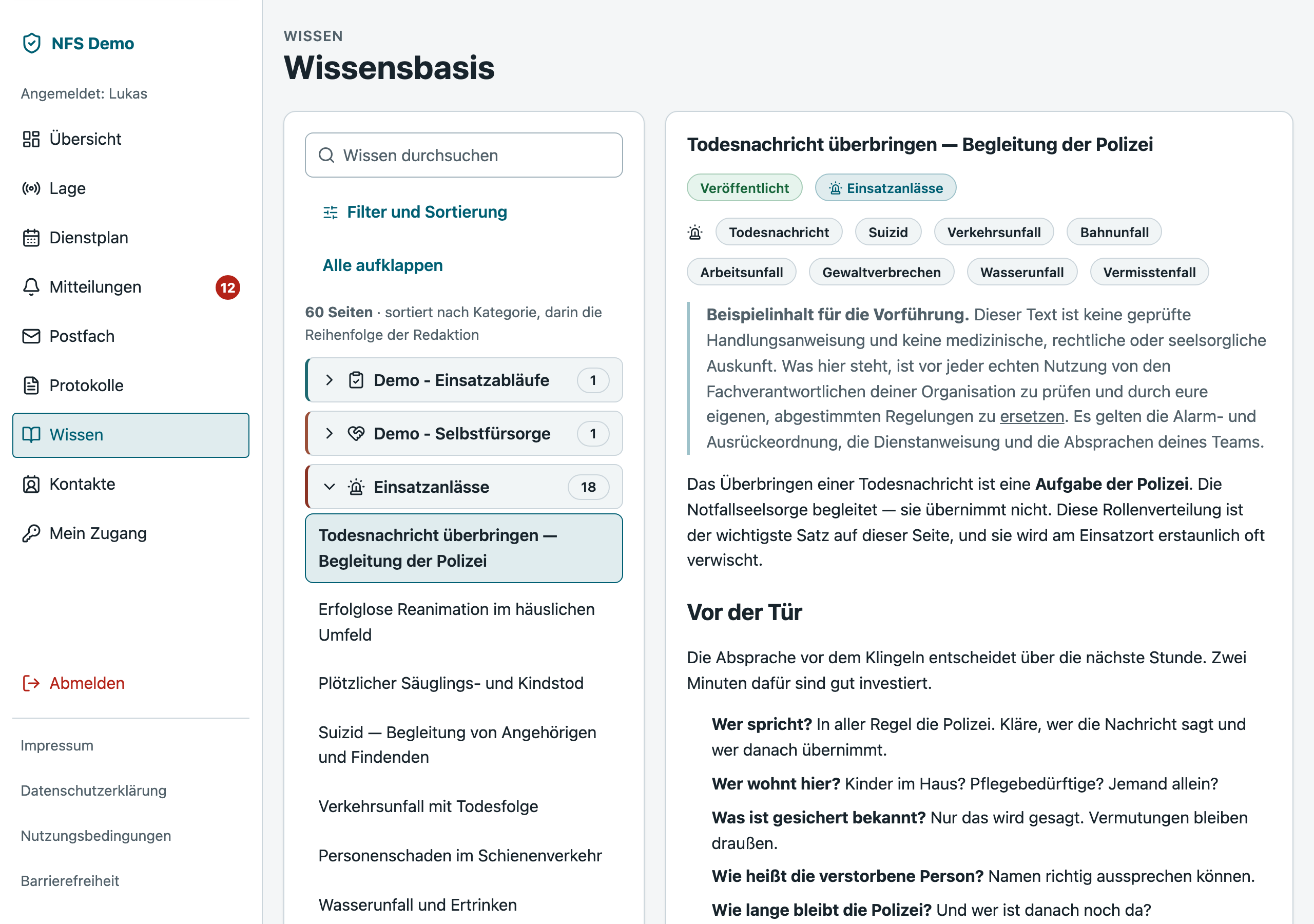
A knowledge base with three example pages looks like a prototype. Sodalis ships with 62 usable entries — as a starting point, not as doctrine.

  • 62 knowledge pages from the startIncident types, working with police, fire service and EMS, confidentiality and documentation, aftercare and self-care. Every page carries a visible notice that your own subject-matter leads must review and replace it before it counts in the field.
  • Matched to the incident, not to a search boxEach page can be linked to incident types. The incident screen then shows exactly the articles that belong to this situation — nobody has to operate a search field under stress.
  • Contacts the whole team maintainsFire and ambulance stations, hospitals, undertakers, police, neighbouring teams — with category, location, numbers and notes anyone may add. Correct a number once and it is corrected for everyone.
Screenshot to follow
Knowledge page linked to incident indications, contact list with categories
Notifications

An e-mail you do not have to open the app to understand

The standard is a single question: can the person reading it decide without signing in? Somebody is needed at short notice the day after tomorrow does not pass that test.

  • Everything the decision rests onWeekday and date written out, duty hours, the role in plain words, who was rostered and who is asking, by when an answer is needed — and a direct route to saying yes, rather than please check the roster.
  • Everyone sets their ownWhich kinds of message arrive by e-mail is the recipient's decision. People who get too many e-mails mute the sender — and after that the urgent request does not arrive either.
  • A daily cap against the floodSet a limit and the rest arrives in the evening as one summary instead of twelve separate messages. Urgent messages always override the cap.
  • Unsubscribing is one clickEvery unsubscribable message carries the unsubscribe route in its headers, as the large providers require. An urgent request in a spam folder is not a cosmetic problem in this application.
Screenshot to follow
Cover request as an e-mail, light and dark
Documentation

Structured forms. No free text.

Incident records in Sodalis have no field for a narrative. Date, indication, alerting authority, number of people affected, measures taken, onward referral, duration, personnel deployed — and nothing else.

This is not a missing feature. It is the most important decision in the product. Most volunteer Notfallseelsorgende in Germany have no right to refuse testimony in court. A system that invites detailed written documentation increases their personal legal exposure. We do not build features that expose the people using them.

Who may read the content is likewise fixed, and not a setting: the participants, the author, and those holding the management capability. Everyone else sees title, date and status. Attachments follow the same rule enforced at the same place in the code — two implementations of one rule drift apart.

What this still produces is a defensible annual report. It comes out of the structured fields rather than out of prose somebody would have to read and code later.

Data protection and security

The questions a data protection officer asks

The honest version first: the shared application layer is the real boundary between two organisations. Nobody here will claim access is physically impossible — a competent data protection officer asks exactly that.

A separate database per team

Each organisation gets its own Postgres database with its own database role, holding no rights to any other database. Export, restore and deletion are therefore ordinary database operations rather than bespoke tooling.

Germany, and no US processors

Servers, backups, mail delivery and geocoding sit in Germany or the EU. So does the analytics for this page. There is no service in the data path subject to the CLOUD Act.

Two-factor, without exception

There is no switch that turns it off — not in development, not behind an environment variable. The former test bypass was removed outright, because it was one mistyped variable away from an open system.

A backup that has been proven

Encrypted before the data leaves the server. A weekly job actually restores into a throwaway database and compares row counts and migration state. Last measured: 175 seconds end to end. An untested backup is not a backup.

A deletion policy with periods you set

Data export under Art. 20, pseudonymising deletion, retention periods. The duration is the controller's decision — yours — and not the processor's.

An audit trail, including over me

Roster and role changes, user administration, access to profile data. Operator support access is time-limited, requires a stated reason, and appears in your audit trail so that you can see it yourself.

Accessibility

Built for volunteers whose average age is over 55

Accessibility here is not a certificate on the wall. It is the reason the system is usable on a phone at night.

Three type sizes

The setting applies to the whole application rather than to single pages — every size is relative, so this one number scales everything.

Light and dark

The dark version is not an inverted light one: its own surfaces, its own status colours, its own focus ring. An inverted palette produces grey mush and a warning nobody reads as a warning.

Targets from 44 pixels up

Everything tappable derives from a single value in the code. That makes the rule structural rather than a request in a guideline.

Contrast calculated, not eyeballed

Body text at 14.6:1. If an organisation picks its own colours, the server checks them on save in both light and dark and rejects what does not hold.

Nothing scrolls sideways

Verified at 375, 768, 1100 and 1440 pixels — in the largest type size, because that is where the longest German compound noun hits the edge first.

Errors are never colour alone

Text first, icon second, colour third. An automated accessibility check runs over every route and blocks release.

What Sodalis is not

Sodalis is not a primary dispatch path. The Leitstelle still reaches the duty lead by phone, and it stays that way. That exclusion is not only stated here; it is explicit in the contract.

What the system does is secondary call-out: requesting additional people when a situation grows beyond what was planned. That is a different thing from the route by which an incident begins in the first place — and the difference matters too much to hide in the small print.

Pricing

Two numbers, no tiers

Independent of how large your team is. Fifteen people cost the same as fifty. There are no add-on modules and no price tiers by headcount.

Setup

€300
one-off, at the start
  • Your own instance with its own database
  • Import of member and contact data from your list — in any format
  • Your colours and your logo
  • Role requirements, duty hours and deadlines set to your own rules
  • Training for the administrators, plus a trained deputy inside your team
  • Invitations sent to every member

Annual licence

€550
per year, for the whole team
  • All features, all people, no upper limit
  • Updates and new features included
  • Daily encrypted backup with a weekly restore rehearsal
  • Data processing agreement, in the church-law variant on request
  • E-mail support within contractually agreed hours
  • Data export you can trigger yourself at any time

The price covers servers and working time. It is calculated to cover costs rather than to maximise profit — which is the reason there are no tiers, not an oversight.

Small team, tight budget?

Then write to me. If you are a small, entirely voluntary team and the price is what would stop this, I will make you an offer that fits. That sentence is here because it is meant, not because it reads well.

admin@flamingbattenberg.de
Roadmap

What exists, and what is coming

A roadmap is a plan, not a promise. Anything listed as planned is not sold and is not charged for. Anything listed as available you can touch in the demo today.

  1. Available

    Roster, cover and swaps

    Month grid with multi-select, three roles, deadlines, absences, special duties and administrative override.

  2. Available

    Knowledge, contacts and proximity search

    62 knowledge pages, contact management with coordinates and manual correction by map pin, postcode search with no third-party service.

  3. Available

    Incident documentation and statistics

    Structured forms on the PSNV model, a visibility rule covering content and attachments, incident companion from start to close, annual report.

  4. Available

    Notifications and mailbox

    E-mails carrying every relevant detail, per-person settings, a daily cap against message floods, unsubscribe route in the headers.

  5. In progress

    Call-out with responses

    Secondary call-out with real responses — on my way, arriving in 20 minutes, cannot make it — and a live count for the duty lead. Escalation runs in waves; the final stage shows the phone numbers of those who have not answered.

  6. In progress

    Phone app with push

    Installable without an app store, with push notifications and an offline store: contacts with coordinates and your own roster window work without a network.

  7. Planned

    Native apps for iOS, iPadOS and Android

    Dedicated apps with push through Apple and Google directly, with no intermediary provider. The push payload stays content-free — an identifier only, never names, never incident detail. The app fetches the content over its own API.

  8. Planned

    Print, PDF and calendar subscription

    Print the roster, export records as PDF, subscribe to your own duties in the calendar of your choice.

  9. Planned

    English and further languages

    The language boundary inside the code is already drawn — what is missing is the translation itself. Until then the application is German.

  10. Planned

    External penetration test

    Once tenant separation and authentication are stable, an external team tests the application. The result gets named to customers rather than withheld.

Getting started

From your list to a running system

You do not have to prepare or convert anything. An organisation with 50 members and 300 contacts is set up in under an hour.

You send what you have

A spreadsheet, a list, an e-mail, a phone call. The format does not matter — importing it is my work, not yours.

I set up your instance

Your own database, your colours and logo, your role requirements, your duty hours and deadlines.

Invitations go out

Everyone sets their own password and configures two-factor sign-in. There are no administrator-issued passwords — not even at the start.

Training, and a deputy

One session for the administrators, and a second trained person on your side with emergency access — so you do not depend on my availability.

Who is behind it

Christoph Seiler, Flaming Battenberg

Sodalis is built and run by one person. That has advantages — short paths, no call centre, no change that has to pass a committee — and one obvious drawback.

I would rather raise it myself than leave it to the question in the sales call: what happens if I stop tomorrow? Four things that therefore apply, and are in the contract:

More projects by Flaming Battenberg

  • Your data is yoursA complete export can be triggered by you at any time, in an open format, without asking me and without waiting for me.
  • A trained deputy on your sideOnboarding includes making sure one person in your team knows the administration and holds a documented emergency access.
  • Service hours are limited, explicitlyThere is no 24/7 promise. What is committed is in the contract; what is not in it, I do not promise. A promise that fails when it matters is worse than none.
  • Notice if the service endsIf operations are discontinued, there is a contractually committed notice period and full handover of all data.
Frequently asked

What teams want to know before deciding

Where are the servers?

In Germany, with a German provider holding ISO 27001 certification and a data processing agreement available immediately.

No service in the data path is subject to the CLOUD Act — that covers servers, backups, mail delivery, geocoding and the analytics on this page alike.

Do we get a data processing agreement?

Yes, in two versions: under the GDPR, and in a church-law variant for bodies subject to KDG or DSG-EKD.

The contracts are drawn up by a lawyer rather than self-written.

Our sponsoring body is a church. Is that covered?

The strictest standard is applied throughout, including for teams that are only subject to the GDPR. The practically most important consequence is the absence of US processors anywhere in the data path.

For the pastoral-care mandate there is additionally the decision against free text in incident documentation. That is precisely why it was made.

What happens to our data if we cancel?

You trigger the full export yourself, whenever you want, and get an open format. Your database is then deleted; it ages out of backups according to the periods in the deletion policy.

Both are in the contract with stated periods, not promised in an e-mail.

Can we host Sodalis ourselves?

In principle yes — the application runs as a Docker stack. In practice I advise against it unless somebody on your side wants to own backups, restores and security updates permanently.

A backup that has never been restored is not a backup. That is the part self-hosting routinely underestimates.

How quickly do we get help when something breaks?

The committed times are in the contract and are explicitly limited. There is no 24/7 promise, because a one-person operation could not keep it.

That is exactly what the trained deputy in your team is for: the most common support case — somebody locked out of their account — is solved on your side in two minutes.

Does Sodalis replace our WhatsApp group?

No, and that is deliberate. Sodalis is not a messenger and will not become one.

What it replaces are the messages in that group that are really processes: finding cover, swapping a duty, calling for extra people at short notice. Those then have a deadline, a response and a visible status — instead of scrolling out of sight.

Can we try it first?

Yes, with no sign-up and no e-mail address. The demo is a complete instance of your own, with a realistic roster, the 62 knowledge pages and a mailbox.

You can touch everything in it, including the administration. After an hour it is deleted. Note that the application itself is in German.

Have a look

A complete instance with a realistic roster, 62 knowledge pages and a mailbox. You can touch everything — it is your own copy.

Please do not enter real personal data in the demo. Everything you create there is deleted no later than 60 minutes after the session ends.